
Recreating the OP-1 cluster engine in code
I've owned a Teenage Engineering OP-1 for years. It's one of those rare instruments where every interaction feels intentional — the weight of the encoders, the bitmap LCD, the way each synth engine has its own physics. It's not just a synthesizer, it's a design object that happens to make sound.
Last summer I started wondering: what would it take to replicate the OP-1's synthesis engines entirely in software? Not a sample library or a rough approximation — but the actual physics, parameter mappings, and signal flow, all running in a browser. I got deep into it, built out the core audio engine, and then life happened. The project sat untouched for months.
Recently I picked it back up. Added an onboarding flow, polished the interactions, and decided to share it — even though it's still partial. This is a work in progress, and if anyone's interested in building this together, I'd love to hear from you.
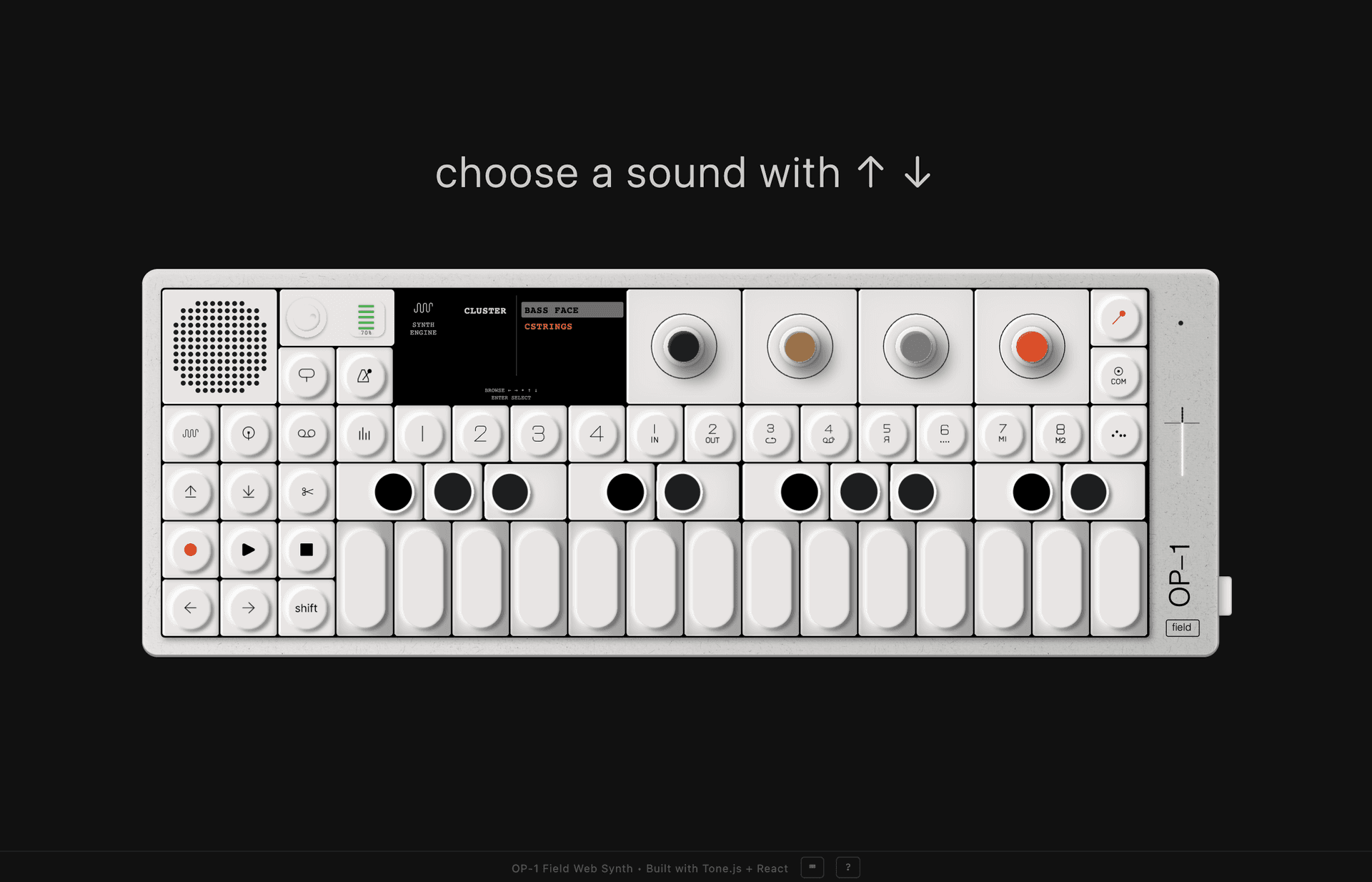
I started with the Cluster engine — not because it's my favorite, but because it's one of the most interesting to reverse-engineer.
The onboarding experiment
The problem with most onboarding is it front-loads everything. Here's a modal. Here's a tooltip. Here are 14 features you'll forget in 30 seconds. It treats learning as information transfer when it's actually closer to muscle memory.
So I tried something different. The synth teaches you by asking you to do one thing at a time. Flip the switch. Pick a sound. Press a key. Each action triggers a short reaction — not an explanation, just an acknowledgment that something happened. Then the next prompt appears.
The reactions are conversational, not instructional. When you play your first note it doesn't say "you have triggered the oscillator." It says something warmer. When you hold a chord and sustain it, the response acknowledges the silence after you let go. The whole thing reads more like a musician showing you their instrument than a product walkthrough.
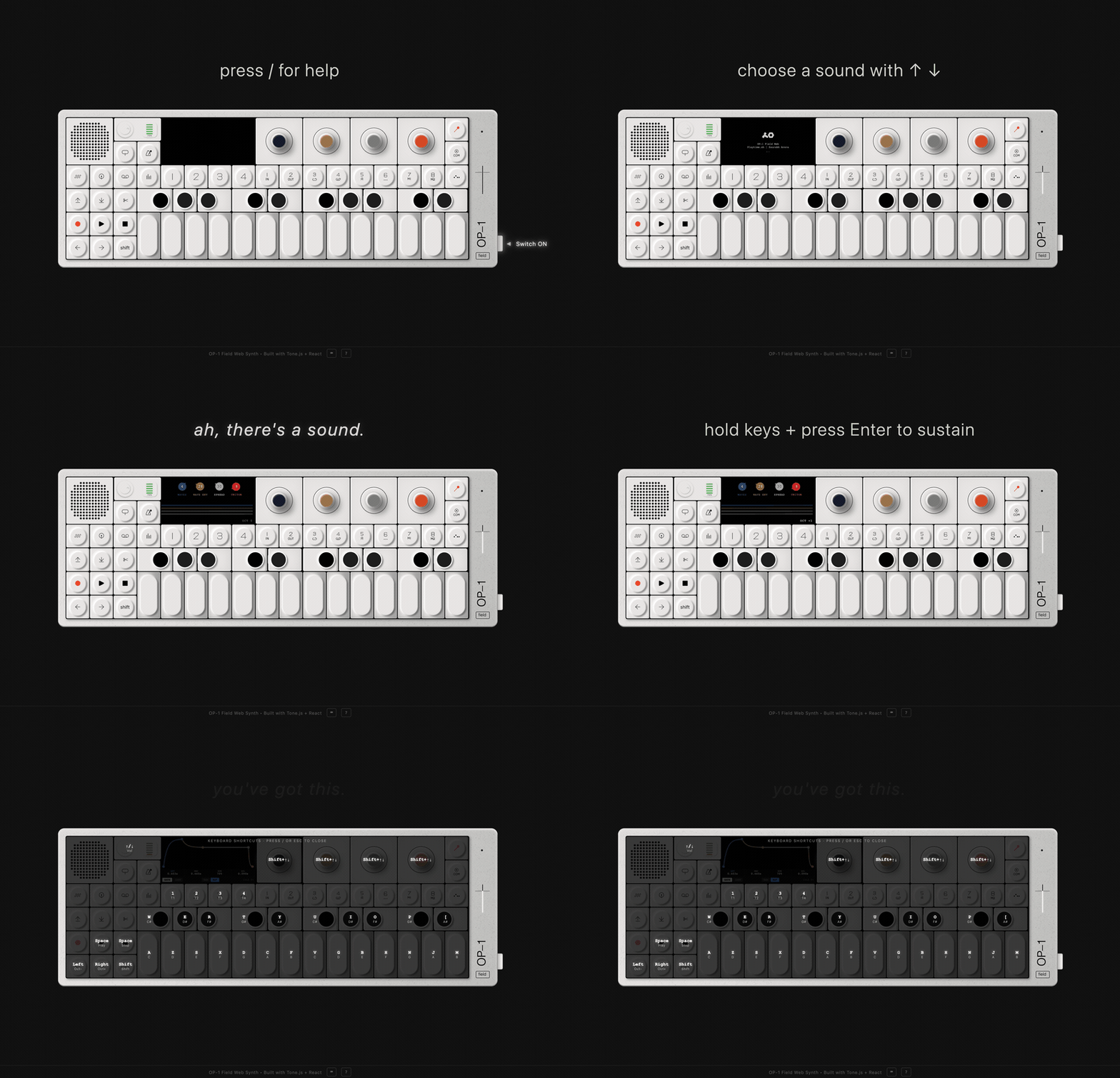
The onboarding walks you through — power on, play a note, shape the sound, and go.
The whole walkthrough is about 90 seconds. Most of that time you're actually playing. If you already know what you're doing and skip ahead, the guide catches up — no forced linearity, no gating. And when it's done, it just says "go make something" and fades out.
I wish more software onboarding felt like this.
What is the cluster engine?
Cluster is the OP-1's supersaw synthesizer. At its core, it's deceptively simple — a stack of sawtooth oscillators, slightly detuned from each other, creating a sound that's much bigger than any single oscillator could produce.
A single sawtooth wave sounds thin and buzzy. But layer six of them, each tuned a few cents apart, and something magical happens — they create interference patterns that constantly shift and shimmer. This is the "supersaw" technique, and it's the foundation of everything from trance leads to ambient pads.
The genius of the OP-1's design is how it maps this complexity to just four encoders:
Controls the intensity of the oscillator stack. At minimum, a thin single sawtooth. At maximum, all 6 oscillators blazing at full volume with widened spread.
Sweeps the lowpass filter cutoff from 200 Hz to 8 kHz and adds resonance. Low values create dark, muffled tones. High values open the filter for bright, cutting sound.
Detunes the 6 oscillators apart from each other by up to 25 cents. This is the classic supersaw trick — slight detuning creates a massive, chorus-like richness.
Controls the chorus LFO rate — how fast the oscillators drift and swirl around each other. Slow rates add subtle movement. Fast rates create vibrato-like modulation.
Each encoder controls a different dimension of the sound. Turn one knob and you're sculpting the harmonic content. Turn another and you're reshaping the frequency spectrum. The four parameters interact in ways that feel organic rather than mathematical.
Visualizing the oscillators
Here's what those stacked sawtooth waves actually look like. Each colored line represents one oscillator in the cluster — watch how they drift apart as spread increases:
The colors follow the OP-1's own palette — blue for the primary oscillator, ochre and white for the middle voices, red for the outer ones. When all six are active and detuned, you can see the phase relationships constantly evolving. That visual complexity mirrors what you hear.
The signal chain
The cluster engine isn't just oscillators — the sound passes through a chain of processors that each shape it further:
Signal flows left to right — each stage shapes the final sound
// The actual Tone.js signal chain
const synth = new Tone.PolySynth(Tone.Synth, {
  oscillator: {
    type: "fatsawtooth",  // Built-in supersaw
    count: 6,             // Fixed at 6 oscillators
    spread: 12.5          // Detune in cents
  },
  envelope: {
    attack: 0.05,
    decay: 0.3,
    sustain: 0.7,
    release: 0.8
  },
  volume: -12  // Headroom for 6 oscillators
});

synth.chain(filter, chorus, limiter, Tone.getDestination());
One critical lesson I learned early: never change the oscillator count at runtime. Dynamically adding or removing oscillators during playback causes audio glitches, dropouts, and occasionally crashes the audio context entirely. Instead, all six oscillators are always running — the waves parameter controls their perceived intensity through volume compensation and spread multiplication.
How Tone.js codifies a synth engine
Tone.js's FatOscillator is the perfect primitive for the cluster engine. It wraps multiple Web Audio oscillator nodes with built-in detuning, which maps directly to the OP-1's spread parameter.
The real challenge was getting the parameter mappings right. Each of the four OP-1 encoders maps to multiple underlying audio parameters with different ranges and curves:
// The "waves" encoder (Blue) — maps to TWO things
case 'waves':
  // 1. Volume boost (0 to +4dB)
  const volumeBoost = intensity * 4;
  synth.volume.rampTo(-12 + volumeBoost, 0.02);

  // 2. Spread multiplier (0.8x to 1.2x)
  const spreadMultiplier = 0.8 + (intensity * 0.4);
  synth.set({
    oscillator: { spread: currentSpread * spreadMultiplier }
  });
  break;

// The "waveEnvelope" encoder (Ochre) — filter sweep
case 'waveEnvelope':
  // Cutoff: 200 Hz → 8000 Hz
  filter.frequency.rampTo(200 + value * 7800, 0.02);
  // Resonance: 0.1 → 4.0 Q
  filter.Q.rampTo(0.1 + value * 3.9, 0.02);
  break;
Every parameter update uses rampTo() with a 20ms transition — this prevents the clicking and popping that would happen with instant value changes. The audio thread gets smooth curves instead of hard steps.
All updates are also throttled to 60fps (16ms intervals). The OP-1's hardware encoders are continuous — dragging them fast can generate hundreds of value changes per second. Without throttling, this overwhelms the Web Audio API.
Play with it
Here's a miniature version of the cluster engine running right in your browser. Drag the knobs to shape the sound, then play notes with the on-screen keys or your keyboard.
Try this: start with spread at zero and slowly increase it. You'll hear the sound go from a thin, single-oscillator buzz to a wide, shimmering wall. That's six sawtooth waves pulling apart from each other by fractions of a semitone.
Then sweep the envelope (ochre knob) from left to right — that's the lowpass filter opening up, revealing harmonics that were always there but hidden.
What's next
The cluster engine is just one of the OP-1's synth engines. There's still the string engine, the FM engine, the drum sampler, the four-track tape recorder, the sequencer, and the mixer — each with its own physics and personality.
This is a work in progress — I'm sharing it because I'd rather build in the open than wait for perfection. If you're into synthesis, web audio, or just think this is a fun project to hack on, reach out. I'd love to collaborate.